
From the tutorial to the castle
Open Fallen Lineage by odanos. The game supports solo play and groups of up to four; you do not need a full party to begin.
Complete the introduction
Follow the game's tutorial until it brings you to your castle. This tutorial-to-lobby sequence is reported in Destructoid's illustrated guide; we have not replayed it.
Recognize the lobby
The castle is your home area. If you are looking for the code field, that same guide places Shop on the right side of the screen, with the entry field at the top of its window.
Read before spending
Inspect the skills and equipment currently shown on your character. Use the skill-tooltip example to distinguish energy cost, cooldown and targeting.
Destructoid reports a 30-minute playtime requirement, a game like and membership in the odanos group. These requirements and code redemption have not been tested by this wiki.
The six classes in the official artwork
The official Roblox image names Warrior, Rogue, Mage, Lancer, Bard and Archer. It confirms those advertised class names, but does not establish a strongest class, current skill values or the order of character-creation screens.
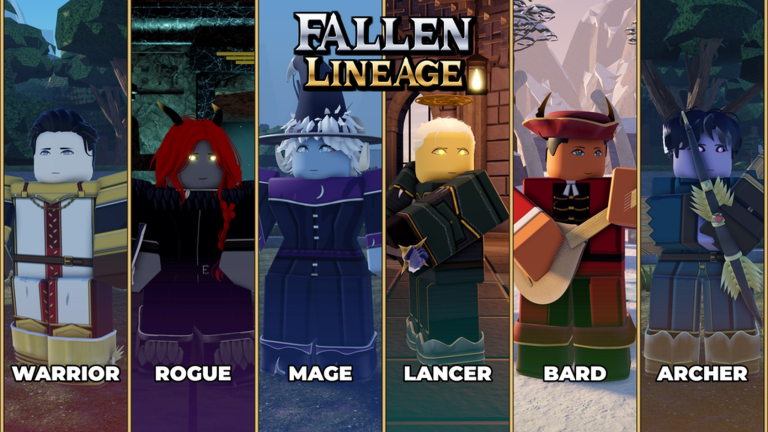
Start by reading the class description and skill tooltips that your current client provides. The class directory separates documented skills from missing details and explains the listed Super Class progression.
What to check at the castle
The community board describes the following facilities. These are source-listed purposes, not a verified map route; unlock conditions and exact interaction prompts remain unconfirmed here.
Training Ground
A place to practice abilities and timing, including against armored enemies.
Read the community card ↗Blacksmith
The board describes upgrading equipped gear and salvaging gear into materials. Read the confirmation before salvaging anything you still use.
Read the community card ↗Gem Cutter
The board says this facility adds skill gems to skills. That is a separate system from equipping a weapon.
Read the community card ↗Prepare for your first run
- Read your available skill tooltips, including the target type and energy cost.
- Check the equipment your character currently has equipped.
- If you are learning with friends, agree who is joining; the advertised party limit is four.
- Use the current in-game prompts to choose a run. The exact expedition-launch menu and button sequence have not been verified for this guide.
For the combat side, continue to Combat & early progression. It explains a real tooltip and separates community progression notes from measured results.
What this guide covers
Roblox's game listing confirms the identity, genre and advertised party size. The class image comes from its official media list. Destructoid supplies the tutorial-to-castle and Shop route. Individual Trello cards supply the community facility notes.
We have not completed a live playthrough. Exact movement keys, mobile combat controls, the expedition-launch sequence and death/reset rules remain unverified. Do not treat a platform creation timestamp as the original release date.